Why Pinterest Feels Like Too Much (And How I Simplified It)
Stop spending hours creating Pinterest content manually. Discover how I simplified my entire Pinterest workflow and now create 20 pins in under 10 minutes.
PINTEREST MARKETING
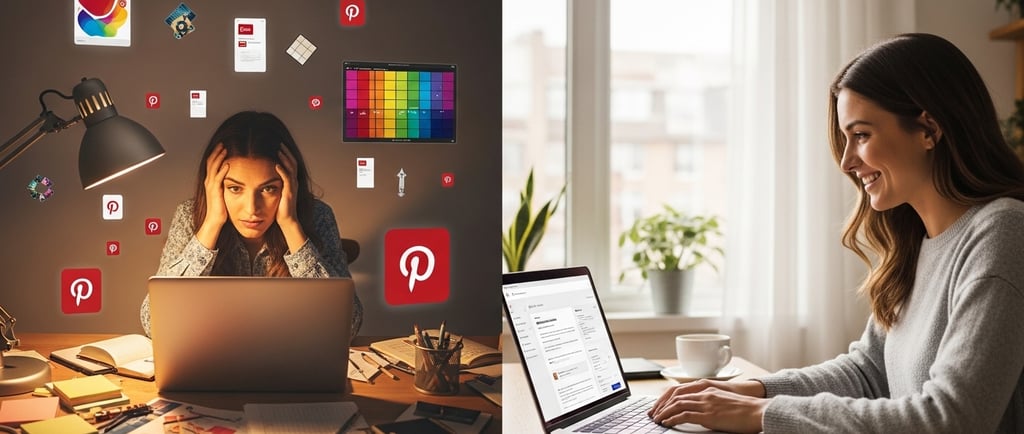
Look, I’m just going to say it: Pinterest used to stress me out. Like, genuinely stress me out. I’d stare at my laptop knowing I needed to create pins for my blog posts, and instead of feeling excited, I’d feel this weird sense of dread.
Twenty different titles? Unique descriptions for each one? Keywords that actually work? Oh—and don’t forget the visuals that need to look polished enough to stand out in an endless scroll of perfectly curated content.
Pinterest promised traffic. But it also felt like a second full‑time job I never agreed to.
The Pinterest Trap Nobody Talks About
What most people don’t tell you when you start taking Pinterest seriously is this: it’s not just about posting pretty images. Pinterest is basically a search engine that happens to use visuals.
That means every single pin is its own tiny content campaign.
In real life, that looks like:
Writing catchy, keyword‑rich titles that grab attention fast
Crafting descriptions that are both helpful and search‑friendly
Creating multiple versions of the same pin because Pinterest favors fresh content
Designing visuals that don’t blend in with everyone else’s
Keeping track of which URLs you’ve already pinned (so you don’t accidentally spam yourself)
At one point, I realized I was spending more time creating Pinterest content than actually writing blog posts.
That was my wake‑up call.
Why the “Just Batch It” Advice Doesn’t Help
If you’ve ever looked up Pinterest tips, you’ve probably heard this one:
“Just batch your content.”
In theory, it sounds great. Set aside a few hours, create a month’s worth of pins, and you’re done.
But batching doesn’t fix the real problem.
You’re still:
Writing every description manually
Opening Canva again and again
Copy‑pasting titles and hoping you didn’t forget to tweak the wording
Running out of creative energy halfway through
By pin number twelve, everything starts to sound the same.
The issue isn’t time management. The issue is how repetitive the process is.
And if you’re running a niche site, an affiliate blog, or managing multiple posts at once? That frustration adds up fast.
What Actually Worked for Me
I’m usually skeptical of tools that promise to make things “easy.” I’ve tried enough of them to know better.
But I eventually gave PinCraft AI a shot—not because it sounded fancy, but because it addressed the exact problems I was dealing with.
It didn’t try to replace my strategy or creativity. It just removed the parts that were draining my time and energy.
The Batch Generator That Changed My Workflow
The biggest headache for me was writing descriptions and titles for multiple posts.
With PinCraft’s Viral Content Engine, I can upload a CSV file or paste in multiple blog URLs (up to 20 at once), and the system handles them together.
For each post, it generates:
Relevant keyword suggestions
Multiple title options that don’t feel copy‑paste
SEO‑friendly descriptions written in different tones
Ready‑to‑use prompts for AI image tools
What I really like is the tone control. I can keep things casual for lifestyle posts and more direct for affiliate content.
And if one piece doesn’t quite fit? I can regenerate just that part without starting over.
That alone saved me hours every week.
Creating Pin Images for Digital Products or Physical Products Without Overthinking Design
I’m comfortable writing—but design isn’t my strength.
Canva works, but I used to spend way too long adjusting fonts, spacing, and colors, wondering if the pin looked “good enough.”
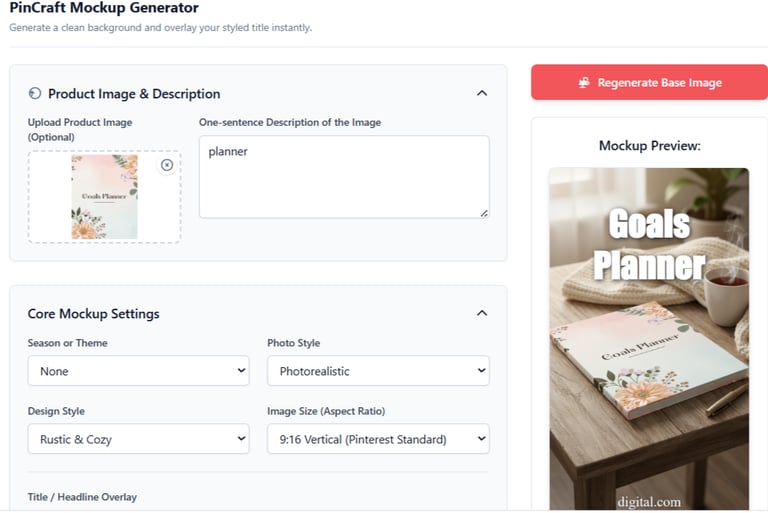
The Mockup Studio inside PinCraft made creating pisn for digital products much simpler.
I upload a basic image—like a screenshot of a planner or a product—and the tool places it into realistic lifestyle scenes. Desk setups, cozy workspaces, coffee shop vibes… all without staging photos or setting up props.
It makes simple visuals look intentional.
The Text Problem Most AI Tools Get Wrong
If you’ve ever used AI image generators, you already know how messy text can look.
That’s why I appreciate PinCraft’s Typography Engine. Instead of baking text into the image, it layers clean, readable text on top.
I can choose fonts, adjust spacing, add shadows, and position text exactly where it works best.
No weird spelling. No unusable images.
The Feature I Didn’t Know I Needed
Pinterest is very particular about how often you pin the same URL.
I learned this the hard way.
PinCraft’s Smart Scheduler tracks every link I’ve created pins for and shows a clear cooldown window (usually seven days). If I try to reuse a link too soon, it stops me.
That alone helps prevent account issues.
There’s also a Sitemap Import feature that pulls in all my blog URLs automatically. From there, I can see what’s ready for new pins, what’s paused, and what’s cooling down.
That level of visibility makes planning much easier.
Why I’m Not Going Back
Some people enjoy manually creating pins. I respect that.
For me, Pinterest is about traffic—not perfection.
Using PinCraft means my pins look cleaner, my descriptions are more intentional, and I’m not burnt out before I even hit publish.
Yes, some advanced features are part of the Pro plan. But even the core tools completely changed how manageable Pinterest feels.
Is It Worth Trying?
If Pinterest matters to your business—whether you blog, sell digital products, or use affiliate links—this is worth testing.
It won’t guarantee viral pins. Nothing can.
But it removes the most tedious parts of the process, which makes it easier to stay consistent.
If you want to check it out, here’s the link: 👉 https://buy.pincraftai.com
Final Thoughts
Pinterest felt overwhelming because the traditional process is overwhelming.
Writing unique content for dozens of pins isn’t a motivation problem—it’s a time problem.
Once I stopped forcing myself through the manual approach and used smarter systems instead, everything felt lighter.
More pins. Better structure. Less stress.
And for the first time in a long while, I don’t dread opening Pinterest.
That alone made the change worth it.